This is a record of my personal and professional journey as I move through the paradigm shift that is education today. I'm currently teaching 28 Year 5-6 kids, aged 9 to 11years. I'm in a single cell class after 10 years of collaborative teaching
Added to that, it's never a dull moment in The Raisin Family...
We had the fabulous privilege to have Dorothy Burt leading us today. I always find that her perspective serves as a bit of a recharge.
Empowered
Learners and Teachers
Each of the 11 Manaiakalani communities has there own "why".
It began with the word "agency"... but that doesn't work within some of our communities, as the agencies that whanau are used to equate to various government Agencies... which equate to also turning their life upside down. Whanau interpretation is more important than ours.
It's important to not slip into a deficit model when talking about our communities. Despite the housing shortages and financial difficulties. Despite the outside influences that are impacting and adding stress.
5+ a day
Creating a dialogue with our kids, to develop their oral language, by bouncing the conversation backwards and forwards 5+ times. (Just like we want to create a thread with our blogging). This is a great strategy to combat the low oral language that our akonga arrive at our door with. By having deliberate conversations with the children we are effecting change in a positive way for them.
Google Forms
We went through a Chalk n talk to create a Google Form. It was great to be forced into amping up the use of it, rather than sticking to the tried and true. We created pathways etc, which was good to actually get stuck in and done.
Google My Maps
I'd never seen or used this before. pins can be dropped on actual maps, then pathways can by mapped, with distances measured etc.
Could use it at the beginning of the year to get kids to locate where they're from. Houses or countries.
Google Sheets
Protecting cells
Super Sheets! Using the Explore tool to work for you, creating graphs etc.
Tips & Tricks
You can freeze more than one row by selecting the row first and then freeze up to row.... You can also "grab" the grey line and drag it to where to freeze to.
Resize columns by highlighting the range. Then go to the top... double click on the blue line that appears. It'll allocate width due to length of word.
Getting Creative with Google Sheets
Split name Add-on... when you have both names in one cell, you can split them into two columns (first and last names)
Crop sheet Add on - to delete all the extra blank cells in a sheet, so that focus is drawn to what you're dealing with.
Filtering for effective workflow and saving to utilise them
Conditional formatting
SPARKLINE adds a visual line to
Macro Recorder... formatting a sheet and recording that, so that you can apply the same formatting to another sheet.
Students carry out a statistical inquiry about their blog.
Open a spreadsheet and gather some data.
What opportunities/provocations are there for 2020?
Who would benefit from doing the DFI next year?
Whoever is new to the Takitini Team!
Whakatau Leader, to ensure that the pedagogy is embedded within the Whakatau team.
To quote Brene Brown... I need to step into the arena!
I'm interested in applying for Google Class on Air for next year.
I want to consolidate some of the systems that hav'nt been working and have them more efficient to hit the ground running.
Today I leapt onto the learning pit alongside my learners to test a new tool. We learned to make a video using Biteable where we could teach others how to comment on our blogs.
It's such an easy tool to use and could be great for akonga sharing their learning about any topic. It also helps the,m to think about font and colour for easy readability for their audience.
How can we take the kids passions and what they do further?
I WANT A DRONE!!!
Live Streaming all school events. We have a multi-cultural school who have whanau all over the world. How can we get what they are doing out to them?
- Streaming from our phones as well as laptops.
Connected
Maaniakalani has created a powerful network. It sprang from a culture where people held things to their chest without sharing.
How can we create stronger connections between our two clusters? School Leaders?
It is our Shared Language, which creates the connection. The pedagogy and kaupapa language. Learn. Create. Share. Visible. Ubiquitous. Connected. Empowered. We create the language for our akonga through the cyber smart programme.
Our akonga need to be able to make authentic connections. In order to make a connection, both parties need to Share.
There's a misunderstanding that Share is about digital sharing. Seeing in real life is always going to be better than seeing digitally, but it makes it possible for people who aren't able to be there and to take it out to a wider network. Face-to-face is always the ideal.
Tuhi Mai Tuhi Atu was designed specifically to connect our learners.
Online Toolkits then came about. It enables us to connect and learn alongside colleagues from around the country.
Google Draw
We looked at ways to utilise Google drawing. It really is the tool for any task and is very underused.
I can see uses that have previously been monopolised by websites, such as Padlet, which were once free but have now locked themselves down to needing to pay to maintain services.
The Google Drawing Sandpit gives some great examples of how this can be utilised in the classroom for a wide variety of uses.
I created the About Me drawing for the sidebar of my Professional Blog.
Google Slides
Concepts around using Slides as a tool to enable access to learning have been sitting in the back of my mind for a while now. I've been trying to throw ideas around in the back of my head, for a method of planning on slides that tick all the boxes and is effective as well as efficient.
There are so many benefits for using slides over docs. It's useful for embedding onto sites. It makes it easy to embed and link content, texts and tasks. There is clear and consistent formatting, making your end-user appreciative. The current week's slide can be moved to the front.
Because you are an editor, you can see the comments. If people are view only, they can't see reflections in the comments. All planning is on slides so that it is visible, while still keeping reflections private to editors because they are comments only.
By putting instructions in the side, off the side of the slide, it means it is there for akonga to see and use, but once they publish it, only the pallette is seen. Same is the case in Google Draw.
You can also insert audio instructions with the teacher's instructions.
Getting traction for change with Google: when something isn't working, then email them with what's not working. Even better, email your class with the wording for what you want them to say and get them to copy and paste the wording into the help box.
I'm envisaging learners creating their own jeopardy game to share their learning from Literacy!
I'm falling down the rabbit hole of additional resources and links at the bottom of each agenda!
Watching "Brené Brown: the Call to Courage" on Netflix tonight has been an absolute privilege. It really resonated with me, particularly with where I'm at right now.
It's really easy to slip back and cruise when things feel a little chaotic and uncomfortable. When we are uncomfortable with our vulnerability, it's easy to default into sticking to your comfort zone and not taking risks.
Brené Brown talks about the fear of criticism. Do you engineer smallness in your life? We'veg all been there. You stick to the status quo and don’t take chances or don’t put yourself out there... because you don’t know whether you can withstand the criticism.
When we've put ourselves out there and regretted it, finding ourselves in a shame shitstorm (her term... I love this term!) you know, where you slip into hibernation, numbing ourselves with tv or a movie. Probably unhealthy foods etc... She reminds us that "it’s not the critic who counts". The credit belongs to the person who’s stepped up into the arena. The one who’s taking chances.
If you choose to be in the arena... You’re going to fall. You’re going to get your arse kicked. If you’re not in the arena, stepping out of your comfort zone then your opinion actually doesn’t count.
Each day when you get out of bed, say to yourself "Today I’ll choose courage over comfort".
Vulnerability is having the courage to show up when you don’t know the outcome. There are millions of cheap seats in the world. It’s not that you don’t give a shit about what anybody thinks, it’s that you don’t give a shit about what some people think. The people who make the list are the people who care about and love you not despite your imperfection and vulnerability but because of your imperfection and vulnerability.
How can you let yourself be loved if you don’t let yourself be seen. When you have thoughts running through your head during uncomfortable conversations, have the courage to say “The story I’m telling myself is...”
Vulnerability
It is often considered to be:
shame
Scarcity
fear
anxiety
uncertainty
But it also gives birth to:
love
belonging
joy
"The opposite of belonging is fitting in."
Belonging is speaking your truth. Being yourself... who you are.
Practice gratitude... Allow yourself to lean into joy.
Understanding what we can do better to "show up":
When you are grateful for what you have, you are able to understand the magnitude of what has been lost. It can be healing.
The ordinary things... the simple moments that you don't take notice of when they are happening. You miss them when they're no longer there and gone. We're quick to chase the extraordinary moments while just skipping over the ordinary.
Just do the joyful thing for the hell of it.
Work Vulnerability
empathy
trust
innovation
creativity
inclusivity/equity
hard conversations
feedback
problem-solving
ethical decision making
No vulnerability = no creativity.
No tolerance for failure = no innovation
We need to ensure we build a vulnerable culture. To not have the conversations because they make you uncomfortable is the definition of privilege. When we build cultures at work where there is zero tolerance for vulnerability, where perfectionism and armour are rewarded and necessary... you can’t have difficult productive conversations.
We spend more than half of our lives at work. You can’t have a joyful wholehearted life if you are miserable at work.
Brave leaders are never silent around hard things.
Our job is to excavate the unsaid.
Vulnerability is defined as: uncertainty risk or emotional exposure. There is no courage without uncertainty or risk.
The Myths of vulnerability:
1. Vulnerability is weakness
2. I don’t do vulnerability
3. I can go it alone
4. You can engineer the uncertainty and discomfort out of vulnerability.
5. trust comes before vulnerability
6. Vulnerability is disclosure
You choose who has the right to share your story. Vulnerability minus boundaries is not vulnerability. You don’t measure vulnerability by the amount of disclosure, you measure it by the amount of courage to show up.
Vulnerability is scary and it feels dangerous... but it’s not as scary and dangerous as getting to the end of our lives and saying “what if I would’ve shown up?” What if I would’ve said I love you?
While trying to find the personal blog I began about a year ago, only for it to sit on the back burner... I stumbled across the blog I began 'way back when'.
This is exactly what I needed right now. This is exactly why we as professionals blog. It gives us a window into how far we have come and the process we go through. I had forgotten so much of this part of the journey as it seemed to go by in a blur.
This blog was 5 years ago.
I was in a single cell class. My kids had individual desks which were identified in a painstakingly labour intensive in-depth consideration as to the seating plan!
Everything was completed in books.
I cannot fathom teaching in this way again. The fact that it was only 5 years ago... when it feels like a lifetime.
Reading it, I can remember the excitement and passion I had for the paradigm shift I was embarking on. I was stepping into an unknown world, where we were leading the charge for those around us. We had to make the mistakes ourselves to find out why some things needed to be done in certain ways.
For anyone who questions why they should have a professional blog... This is why!!!
We explored how to maximise our class/subject sites to maximise visible teaching and learning.
Evaluating Class Sites:
We explored a selection of Class sites looking at the two key criteria of:
Visual appeal - shop window!
User experience - easy to locate ‘stuff’ (2/3 clicks)
considering what works well and what doesn't work well.
Colour checker - put a link to your site and it will analyse points to consider.
Visible Kaupapa
Making teaching and learning visible... essentially can you see it or not? We aren't necessarily talking about John Hattie's work as he takes it to a whole new level which becomes quite complicated. Manaiakalani simplifies this. It's visible not only to learners but to whanau too.
FAIL - so much of the learning journey has traditionally been hidden from the akonga. Dorothy likens it to an adult version of a maze where you can only see a little bit in front of you.
It used to be that those that succeeded were the ones able to read the teachers mind. Those who had an element of cultural capital. When success criteria are open and displayed it opens up the learning journey and makes it visibly accessible. We can take it a lot further still with the intentional use of digital tools. Every step of the journey should be visible.
When we say that the default is visible, what genuinely needs to be invisible or private?
Biodata (Date of birth etc), Health info, Behavioural data etc... sure, however what about assessment info? Five-year-olds know where they sit in relation to their peers. How precious do we need to be? We need to open our minds up about what genuinely must be kept private.
We've been using google sites to repurpose our learning since 1:1 classes began.
Making teaching visible removes the element of surprise for learners and whanau. It provides an advance warning as well as rewind ability afterwards.
Hapara's tagline is Making Teaching and Learning Visible. This is exactly what we are wanting to do. Effectively it enables us to be able to access the children's desk.
Hapara Parent Portal. DO our parents have the ability to access this?
Manaiakalani Google Class On Air
Stalk some teachers and see what it's like. At the end of this term, the applications for 2020 come online. Is this something we can get done down here? I'm seriously considering "stepping into the arena".
Visible Teaching as Inquiry
Having them open and visible across the clusters to access and learn from others, just like our learners. We stress the power of feedback and feedforward for our learners on their blogs. Do we do this ourselves with our own learning as professionals?
This connection only came about because they were visible online in a positive light for learning. A number of people argued that other communities were more impoverished/deserving, however, they didn't have a digital footprint.
Data shows that if a child is present over three years in a Manaiakalani School... the rate of gain in writing was twice that expected nationally. This means that these students on average made one more year's progress above the expected rate per year if they were there for three years.
A concern that when kids go digital, we lock parents out of our children's learning. Schools can create barrier systems to prevent ease of parents being able to find what they have been doing. By making everything visible and making it so that there is no problem with it being visible then we are keeping it open.
Leading Learning using a Google Site
An overview of setting up a class or subject site.
We need to consider the learners' pathways. It all needs to be connected so that kids find it easier to use when transitioning between classes and year levels.
When creating a new site... the first consideration is who are the learners? A site for Chromebook users is very different than a site that is for iPad users. Why are they using the site? What are the key things they are going to go to?
Think really carefully about Colour... you can you tools to pluck out colour from uniforms etc. Do the combinations make your eyes hurt? DO they look okay when viewed on different screens?
Consider Layout... how easy is it on your eye? There's a lot to be said for clutter-free.
It's important to think about using a consistent font. Try not to use more than two. This goes for the things that you are embedding too. Google has begun to include Lexend fonts, which are meant to increase productivity. You can see that they are rather boring though...
The 3 click rule is very important. You should be able to get to anything within 3 clicks.
Purposeful Learning Tasks:
We need to consider how we can ramp up the learning task to utilise the tools available. It's not always "What can we do better?" but how can we redefine the way we are doing things to make it more purposeful and authentic.
For ERO etc, it's very easy to copy sites, so even if you are going to use the same site, it's a good idea to make a copy of it so that it archives everything nicely.
Feedback on our Group Sites
We provided a link to our class site. We received down and dirty feedback. Well... that was the theory. Everyone was actually rather kind. To be fair, many in the room are only starting out with their class sites, so a few kinks were still being ironed out. Ours, on the other hand, are humming as they should be. One of the things that have been frustrating me about mine is the clutter of rewindable learning. I had developed a bad habit of just "dumping" DLO's at the bottom f the page. They were there and rewindable, but the shop window was in disarray! Certainly not providing a visually appealing visual appearance to engage learners.
My feedback from the group was too "nice":
"It looks great. Thanks for sharing Mel."
"Well done Mel. I liked your simple layout and it is easy for children to use."
"Looks great Mel. I like the cleanness and few steps the kids have to go to."
There was nothing I could use to set a goal for my class site for the day. I needed to come up with three specific things I wanted to achieve on my site today. My focus is on User engagement.
Cleaner pages
rewindable learning is clearly marked as per term.
Less “busy-ness"
I need it to be more engaging (insert magic wand of inspiration here)
More “extra’s for expert” for kids to do at home.
I managed to clean a large portion up. It's much tidier and more user-friendly. I still need to be mindful of upping the engagement factor.
I finally got some links in there for literacy. I can just keep adding to this now... meaning kids have a place to go to when they are looking for "Homework" to do.
Sunshine Books:
Manaiakalani gets free copies of Sunshine books, to coincide with the online subscription. There are a huge wealth of resources out there to coincide with them.
Game changers:
Shift + Z - creates a ghost file in a different place.
100-word challenge: put a google form with a picture prompt in. You can then pull them off easily.
Google form: find me an interesting fact.
Today at DFI, our guest facilitator was Lenva, who works 4 days a week for Hapara and the other day for Manaiakalani.
We refer to Cybersmart rather than Cyber Safe to teach our kids how to live in the world rather than be scared in the world. We want our kids to know how to deal with things as they come up and how to keep their own footprint as clean as they can.
One of the most important aspects of the kaupapa is that it is visible. It's all transparent and open.
Smart Learners
It's about being able to tackle different programmes and tackle different parts. Students learn the kawa of care, which is about teaching them to be responsible for their own device and who has access. It's crucial for the culture of looking after the tools for learning. Many assume that our learners know how to use the devices; however, they know how to use them in a different context. Often in a gaming "play/toy" context.
Smart Footprint.
Term 2. The Create Term.
This is where our learners begin to be seen. What do they want people to know about you? How do you want people to see you?
Smart Relationships.
Students interacting with the rest of the world. How do we speak on our (and others) blogs? If it's not positive, thoughtful or helpful then we are not going to say it. Authentic audiences and buddy class blogs encourage us to do this too.
Hapara - Making Learning Visible.
Hapara allows us to focus on teaching rather than technology. Hapara is not really about monitoring and filtering. It's about supporting the teaching. The focus browsing and Filter sessions are for those few individuals who need extra support.
Some key tools:
Sharing: All unshared documents, even those in folders.
All Docs: Every document created.
The only thing you cant see is empty trash, because who really does that?
Filter Session: The opposite to Focus session. You can identify the sites you don't want them to go to.
Comments: Shows all comments made and received by that student.
Workspaces. It can be embedded into the class site. Units can be visible to some students and not others. You can control what they see. They submit it back to the teacher.
Tamaki College is currently undertaking all of their NCEA exams within a focus browsing session and students submit their work upon completion.
Chromebooks
It was all about finding the best device for learning for EVERY young person.
Partnership
Ownership of the Chromebook is a partnership. Often it becomes a family tool. Thus it is not only empowering students but whanau as well. They look after the device better if they own it, rather than when it's a school-owned device.
Participation
Bringing the device to school every day charged.
Because they are all using the same device, it empowers the teachers to work confidently with them.
Protection
It should be seamless. Everything should just happen and be visible.
The important things are behind the scenes.
By teaching a Cybersmart curriculum then we are assisting students to make good choices about what to do when things go awry.
Its a really good idea to go through the Digital Dig so that you know how to assist students with workflow.
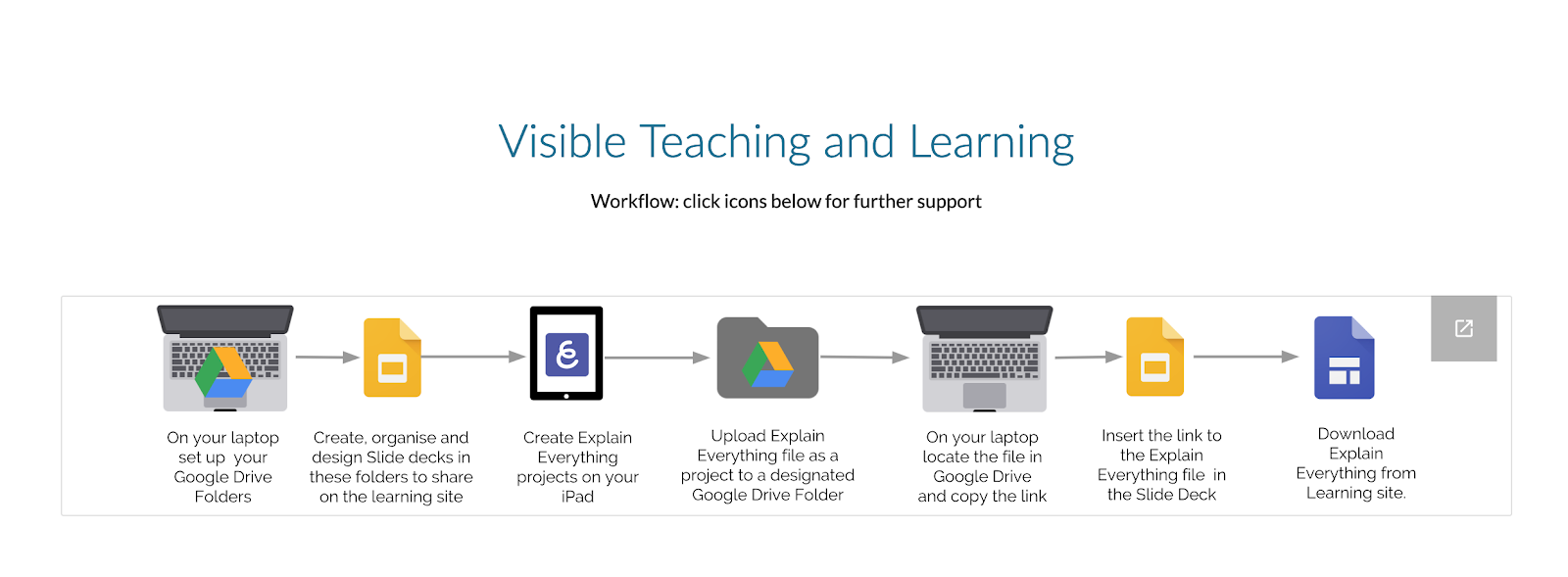
By embedding a link to your Explain Everything on a slide, you can put in easily on your slide.
To view on your Mac, download the Explain Everything Viewer (which sits in your Appa)
Screencastify
We created a Screencastify on how to use a tool. I took the opportunity to create one to share the differences between Onetab and Mini Toby, which we looked at a couple of weeks ago when covering Workflow. My learners use this easily and happily. As adults, I think we are often hesitant to record ourselves. There are so many uses for this tool.